Teachers were losing time before they even started teaching.
Inquisitive is a curriculum-aligned teaching platform used by 50,000+ primary school teachers across Australia and the United States. The content library was growing quickly: hundreds of ready-to-teach units spanning multiple subjects and year levels. That growth was a strength, but it was also creating a problem.
Teachers were spending significant time every week searching for content, losing track of what they had found, and navigating back and forth across the platform just to build a rough plan for the term ahead. There was no way to save, organise or sequence the units they wanted to teach. Every planning session started from scratch.
They needed a planning tool that worked the way they actually planned: by term, by subject, by curriculum. Something that let them build a sequence once and return to it all year. Something simple enough that it did not add another task to an already overwhelming workload.
This was my first project when I joined Inquisitive. I was the sole designer, working directly with the Head of Product and a small development team. The brief was open-ended: make planning better. Everything from research through to final UI was mine to own.
Planner: an interactive prototype
What teachers are saying
I find the planner a very useful resource to plan.
Thanks again for all your hard work, we love Inquisitive and the new format for units.
Easy and efficient interface.
Loving the easy access to the planned modules. This was a really great idea.
love the lesson suggestions and resources that go along with it. It is very user friendly and follows the curriculum well.
Very efficient for retrieving current learning materials.
This is a game changer for Homeschooling. No longer do I have to stress about curriculum outcomes, assessments or lesson planning, it took me 1 night to organise lessons for 3 of my children. Thank you Inquisitive.
This is brilliant, I love this feature!
I love the planner. It helps me so much to manage my term planning. I can quickly go into the topics.
I find the planner really useful for my overall termly and yearly planning.
Love the planner. I can find my subjects really easy this way
Helps sort classes. I have a position where I have different classes all day so it's quick to go to each one in the planner.
it makes my planning very easy
planner is helpful!
WOW!!! Thank you so much. I played with it a little last year, but this year I want to use it. It was so easy to do my planning. Thank you
Love it..set out well
Love it thank you
Love the planner.
It's awesome
Love it!
It s so easy to use
Solo designer. Two dozen teacher interviews. Built in phases.
I owned research, design and validation end-to-end. Over the course of the project I conducted more than twenty teacher interviews, ran usability testing sessions through UserTesting and Zoom, analysed support ticket patterns and in-app behaviour data, and maintained a continuous feedback loop through Planner's built-in feedback mechanism. I used Figma for all design work, Dovetail for research synthesis, and worked in two-week cycles with the development team.
A key research finding shaped the entire architecture: teachers think in units, not individual resources. A unit is a structured teaching sequence, typically spanning several weeks, and it is the fundamental building block of how teachers plan a term. Every design decision flowed from that insight.
Teachers think in units, not individual resources.
Phase 1: Save for later
The first release was deliberately minimal. Teachers could save individual units to a personal list, giving them a single place to collect content they intended to teach. No organisation, no sequencing, just a reliable way to bookmark. This validated the core need and gave us a foundation to build on.
Phase 2: Term-based organisation
Teacher interviews consistently revealed the same mental model: planning happens term by term. Teachers sit down before a term starts and map out what they will teach across each subject, week by week. The second phase introduced term-based organisation, letting teachers group saved units into terms and arrange them in sequence.
This was the release where Planner started to feel like a real tool rather than a feature. Teachers could now open their Planner at the start of term and see exactly what they had planned, in order, ready to teach.
Phase 3: In-Planner discovery
A recurring frustration in early feedback was the disconnect between browsing and planning. Teachers would find a unit in the content library, save it to Planner, then have to navigate back to the library to continue browsing. The context switch was disruptive.
I designed a slide-out unit preview panel that let teachers explore unit details, view lessons and access teaching materials without leaving Planner. This kept teachers in their planning flow and significantly reduced the navigation friction that had been slowing them down.
This phase also introduced curriculum-aligned filtering within Planner itself, so teachers could search for units by subject and year level without leaving the planning context.
Phase 4: Suggested units
By this point, Planner had strong engagement, but I noticed a pattern in the data and interviews: teachers were spending time searching for units to fill gaps in their term plans. They knew they needed something for, say, Year 3 Science in Week 6, but had to leave Planner to go find it.
I designed a suggestion system that surfaced relevant units based on what the teacher had already planned: their year level, subjects, curriculum alignment, and what gaps remained in their term. Suggestions appeared contextually within the Planner interface, right where the gap existed.
This was not about algorithmic cleverness. This was about following one principle that guided the entire project: reduce the number of steps between a teacher deciding what to do and actually doing it.
Reduce the number of steps between a teacher deciding what to do and actually doing it.
A planning tool that matches how teachers actually work.
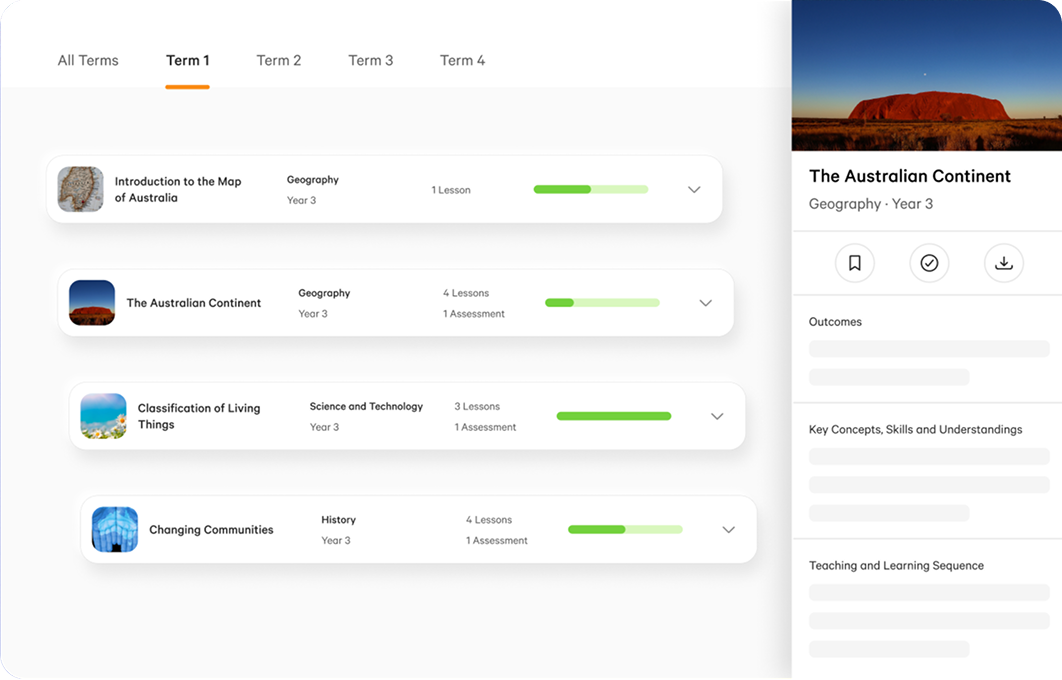
The final Planner is a focused, single-purpose tool that sits at the centre of how teachers interact with the platform. It is structured around the mental model that emerged from research: terms, subjects and units.
Unit-based structure. Every item in Planner is a complete teaching unit, not an individual resource. This matches how teachers think about planning and eliminates the granularity problem that made earlier approaches feel cluttered.
Term-based layout. Planning is organised by school term, with clear visual separation between terms. Teachers can see an entire term at a glance and identify gaps immediately.
Drag-and-drop sequencing. Units can be reordered within a term by dragging, making it easy to adjust plans as priorities shift or new content becomes available.
In-context unit preview. A slide-out panel shows full unit details, lessons and teaching materials without navigating away from Planner. Teachers stay in their planning flow.
Curriculum-aligned filtering. Teachers can filter by subject and year level within Planner, narrowing results to exactly what is relevant for their class.
Contextual suggestions. Planner surfaces recommended units based on the teacher's year level, subjects and existing plan, helping fill gaps without requiring a separate search.
The entire tool was designed around simplicity. Every interaction is one or two steps. There are no settings to configure, no onboarding flow to complete, no modes to switch between. Teachers open Planner and start planning.
25,000+ regular users. 30% conversion lift.
Planner became the most-used feature on the platform. Over 25,000 teachers use it regularly, with more than 50% of active users engaging with it weekly. It is the first thing many teachers open when they log in.
The business impact was equally clear. Planner drove a measurable 30% increase in free-to-paid conversion. Teachers who used Planner during their trial were significantly more likely to subscribe, because the tool demonstrated immediate, tangible value: time saved, planning simplified, content organised.
Before Planner, teachers regularly contacted support asking how to save content, how to organise their teaching schedule, how to find units they had previously viewed. Those questions disappeared entirely.
Teacher feedback has been consistently strong. The tool is regularly described as the single most valuable feature on the platform. Teachers report that it has saved them hours of planning time each week and fundamentally changed how they interact with the content library.
Teachers are not asking for more. That does not mean the work is done.
Planner is stable, well-loved and deeply embedded in how teachers use the platform. The absence of feature requests is itself a signal: the tool does what teachers need it to do, without getting in their way.
But there are opportunities I am watching. Collaborative planning, where multiple teachers in a school share and coordinate term plans, is a natural extension that several schools have asked about. Integration with external calendar and LMS tools could reduce the gap between planning in Inquisitive and executing in the classroom.
There is also a broader platform question. Planner proved that a single, well-designed feature can shift core business metrics. That principle, start with the user's real workflow, build the simplest thing that serves it, then iterate based on evidence, is one I have carried into every project since.
Planner proved that a single, well-designed feature can shift core business metrics.
The best tools are the ones people stop thinking about. They open them, do what they came to do, and get back to work. That is what Planner became, and that is what I aim for in everything I design.